Connect the network cable to the Ethernet port at the rear panel of MX3600. Connect the other end to your
hub or switch.
2.Connect the power adapter to a power outlet, and plug the power cord into MX3600’s power input
at the rear panel.
3.Locate the power button at the rear panel of MX3600. Press it once to power on the NAS.
4. MX3600 will start a bootup process, and the system power LED will blink continuously Boot up time is approximately 1 3 minutes. System Power LED HDD Activity LED System Reset USB Eject Button / USB Copy Button USB 2.0 port to add storage or to connect o to printer Auto sensing 10/100/1000 Base T Ethernet port (Auto MDIX) DC In Power Button4

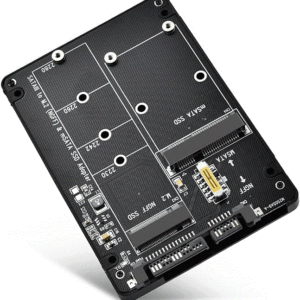 ELUTENG M.2 NGFF to SATA Adapter MSATA and B Key/B&M Key (Not Support NVME SSD) M.2 NGFF SDD to 2.5" SATA III 2 in 1 Converter Supports MSATA/M.2 NGFF 2280, 2260, 2242, 2230
1 × 250,00 EGP
ELUTENG M.2 NGFF to SATA Adapter MSATA and B Key/B&M Key (Not Support NVME SSD) M.2 NGFF SDD to 2.5" SATA III 2 in 1 Converter Supports MSATA/M.2 NGFF 2280, 2260, 2242, 2230
1 × 250,00 EGP 


































There are no reviews yet.