



DEVICE STORAGE, Internal Hard
Dell OEM PowerEdge T3600 SAS PERC 8 Raid Contriller Cable – T3F4V
Availability:
Out of stock
Dell OEM PowerEdge T3600 SAS PERC 8 RAID Controller Cable - T3F4V
200,00 EGP
Out of stock
CompareDell OEM PowerEdge T3600 SAS PERC 8 RAID Controller Cable – T3F4V
Overview: The Dell OEM PowerEdge T3600 SAS PERC 8 RAID Controller Cable is designed to facilitate high-speed data transfer between the RAID controller and storage drives in a Dell PowerEdge T3600 workstation. This cable is essential for ensuring reliable connectivity and optimal performance of your RAID setup.
Key Features:
- Compatibility: Specifically designed for use with the Dell PowerEdge T3600 workstation and its PERC 8 RAID controller. Ensures proper fit and functionality within this system.
- Cable Type: SAS (Serial Attached SCSI) cable, used for connecting SAS drives to the RAID controller. Supports fast and reliable data transfer.
- Connector Type: Features SAS connectors at both ends to interface with the RAID controller and the SAS drives or backplane. These connectors ensure secure and stable connections.
- Part Number: T3F4V. This unique part number identifies the specific cable model, ensuring compatibility with the PowerEdge T3600 and PERC 8 RAID controller.
Benefits:
- Reliable Performance: Ensures stable and high-speed data transfer between the RAID controller and the connected SAS drives, critical for maintaining system performance and data integrity.
- Efficient Storage Management: Allows the RAID controller to effectively manage multiple SAS drives, supporting various RAID levels for enhanced storage performance and redundancy.
- Ease of Use: Designed for easy installation in the PowerEdge T3600 workstation. The cable is typically plug-and-play, minimizing installation complexity.
Installation Instructions:
- Power Down: Turn off the workstation and disconnect it from the power source to ensure safety.
- Locate Components: Open the workstation chassis and locate the PERC 8 RAID controller and the SAS drives or backplane.
- Connect Cable: Attach one end of the SAS cable to the RAID controller and the other end to the SAS drives or backplane. Ensure that the connectors are securely seated.
- Cable Management: Route the cable to avoid interference with other components and ensure it is neatly organized within the chassis.
- Reassemble and Power On: Close the workstation chassis, reconnect the power, and turn on the system. Verify that the RAID controller detects the connected drives and they are functioning correctly.
Based on 0 reviews
Be the first to review “Dell OEM PowerEdge T3600 SAS PERC 8 Raid Contriller Cable – T3F4V”
Related products
-
DEVICE STORAGE
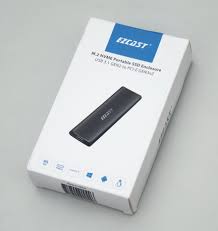
Ezcast M.2 NVMe Portable SSD Enclosure
-
- Unique Aluminium Slim Design.
- Portable and easy to carry.
- USB 3.1 Gen 2 interface up to 9Gbps super speed transfer rate.
- Large capacity external drive.
- Easy installation, no driver required.
- Supports M.2 NVME SSD with 2230/2242/2260/2280/ four specifications.
- Supports Windows/MAC OS/Linux/Android.
- Specifications:
- Interface: USB 3.1 Gen 2 Type-C
- Supported SSD Type: M.2 NVMe
- Supported Sizes: 2230, 2242, 2260, 2280
- Material: Aluminum alloy
- Compatibility: Windows, macOS, Linux, Android
- Capacity: Supports large capacity external drives (capacity depends on the installed M.2 NVMe SSD)
SKU: 4712899900496 -
-
DEVICE STORAGE, SSD
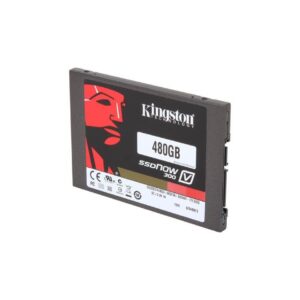
Kingston SSD 480GB SATA III 2.5” Internal Solid State Drive Notebook Desktop
Features
Low Noise Level, Removable
Storage Format:
HDD & SSD
Country/Region of Manufacture:
Taiwan
Item Width:
2.76
Writable Format:
SSD
Interface:
SATA III
Storage Capacity:
480GB, 480 GB
Read Speed:
500MB/s
Compatible With:
Laptop, Mac, PC
SKU: 1030



































There are no reviews yet.