

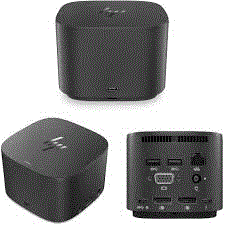
HP HSN-IX01 – HP USB-C Thunderbolt G2 120W Docking Station
1 in stock
-
Connectivity Ports:
- 3 x USB 3.0 Ports: High-speed ports for connecting peripherals such as external hard drives, keyboards, and mice. USB 3.0 supports fast data transfer rates.
- LAN (RJ-45) Port: Provides a wired Ethernet connection for stable and reliable network access, ideal for environments where Wi-Fi may be less reliable or secure.
- Audio Jacks (3.5 mm): Typically includes separate jacks for headphones/speakers and a microphone, allowing you to connect audio devices easily.
- 2 x DisplayPort: Supports high-definition video output to external monitors. Useful for dual-monitor setups or connecting to high-resolution displays.
- 2 x USB Type-C Ports: Modern connectivity options that can support data transfer, power delivery, and video output, depending on the device and dock’s capabilities. Check if the ports support Thunderbolt or other advanced features.
- VGA Port: Provides support for older display devices and projectors. VGA is often used in legacy systems and presentations.
-
Design and Build:
- Compact and Functional: Designed to provide extensive connectivity while maintaining a relatively compact form factor, suitable for desktop use.
- Versatile Compatibility: Typically compatible with laptops that have USB-C, USB 3.0, or specific docking connectors. Check for compatibility with your laptop model.
-
Power Delivery:
- Power Pass-Through: Depending on the model, the dock may offer power pass-through to charge your laptop via USB-C. Verify the dock’s specifications to ensure it supports this feature.
Compatibility:
- Laptops: Generally compatible with laptops that have USB-C or USB 3.0 ports. For USB Type-C ports, confirm whether they support video output (DisplayPort over USB-C) and power delivery if needed.
- Legacy Devices: The VGA port ensures compatibility with older display technologies.
Setup and Use:
- Connection: Connect the docking station to your laptop via the appropriate port (USB-C or docking connector). Ensure the laptop is securely docked.
- Peripheral Connection: Connect your monitors, keyboard, mouse, network cable, and audio devices to the docking station.
- Drivers and Updates: Install any necessary drivers or firmware updates from the manufacturer’s support site to ensure proper operation.
Considerations:
- Performance: Ensure that the docking station meets your performance needs, especially if connecting multiple high-resolution monitors or performing high-data-transfer tasks.
- Compatibility: Verify that your laptop model supports all the docking station’s features, including video output through USB-C if applicable.
1.250,00 EGP
1 in stock
Compare-
Connectivity Ports:
- 3 x USB 3.0 Ports: High-speed ports for connecting peripherals such as external hard drives, keyboards, and mice. USB 3.0 supports fast data transfer rates.
- LAN (RJ-45) Port: Provides a wired Ethernet connection for stable and reliable network access, ideal for environments where Wi-Fi may be less reliable or secure.
- Audio Jacks (3.5 mm): Typically includes separate jacks for headphones/speakers and a microphone, allowing you to connect audio devices easily.
- 2 x DisplayPort: Supports high-definition video output to external monitors. Useful for dual-monitor setups or connecting to high-resolution displays.
- 2 x USB Type-C Ports: Modern connectivity options that can support data transfer, power delivery, and video output, depending on the device and dock’s capabilities. Check if the ports support Thunderbolt or other advanced features.
- VGA Port: Provides support for older display devices and projectors. VGA is often used in legacy systems and presentations.
-
Design and Build:
- Compact and Functional: Designed to provide extensive connectivity while maintaining a relatively compact form factor, suitable for desktop use.
- Versatile Compatibility: Typically compatible with laptops that have USB-C, USB 3.0, or specific docking connectors. Check for compatibility with your laptop model.
-
Power Delivery:
- Power Pass-Through: Depending on the model, the dock may offer power pass-through to charge your laptop via USB-C. Verify the dock’s specifications to ensure it supports this feature.
Compatibility:
- Laptops: Generally compatible with laptops that have USB-C or USB 3.0 ports. For USB Type-C ports, confirm whether they support video output (DisplayPort over USB-C) and power delivery if needed.
- Legacy Devices: The VGA port ensures compatibility with older display technologies.
Setup and Use:
- Connection: Connect the docking station to your laptop via the appropriate port (USB-C or docking connector). Ensure the laptop is securely docked.
- Peripheral Connection: Connect your monitors, keyboard, mouse, network cable, and audio devices to the docking station.
- Drivers and Updates: Install any necessary drivers or firmware updates from the manufacturer’s support site to ensure proper operation.
Considerations:
- Performance: Ensure that the docking station meets your performance needs, especially if connecting multiple high-resolution monitors or performing high-data-transfer tasks.
- Compatibility: Verify that your laptop model supports all the docking station’s features, including video output through USB-C if applicable.
Based on 0 reviews
Be the first to review “HP HSN-IX01 – HP USB-C Thunderbolt G2 120W Docking Station”
Related products
-
Accessories, AV / VIDEO
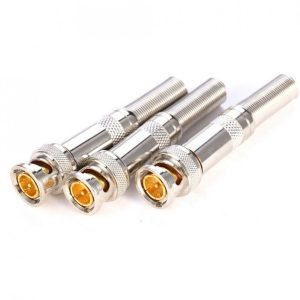
BNC 75-5 JR-B25 Male Solderless Connector CCTV Camera System Copper Pin
Simply & Professional appearance for BNC cabling;
Easier for camera installation, save time and more securer cable connection;
General quality termination; No electrical tap, No splicing, no crimping, but only a small screw driver;
Material: Copper Pin and Zinc Alloy body;
Size: 58mm x13.3mm
SKU: 1000000001947 -
Accessories, Extension
USB 2.0 Extension Extender Cable Cord Standard Type A Male To A Female M/F Black 1.5 meters
 Accessories, Extension
USB 2.0 Extension Extender Cable Cord Standard Type A Male To A Female M/F Black 1.5 meters
This USB Extension cables create an easily accessible USB port for most of your small USB Devices such as Flash Memory Pen Drives, Digital Cameras, and cell phones.
Both low and high speed USB devices will function equally well with this USB extension cable
Connectors: USB Type A female to Type A male
Passive USB extension cable is good for small electronics such as cell phone, GPS, Memory Card readers, mp3 players, etc.
SKU: 100000150000


































There are no reviews yet.