
-
×
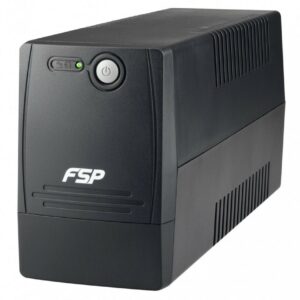 FSP Fortron UPS 2000 VA La Serie FP Line-Interactive UPS Offre Una FP2000
1 × 8.200,00 EGP
FSP Fortron UPS 2000 VA La Serie FP Line-Interactive UPS Offre Una FP2000
1 × 8.200,00 EGP -
×
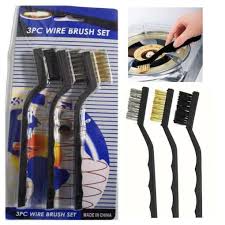 3pc Wire Brush
1 × 30,00 EGP
3pc Wire Brush
1 × 30,00 EGP
Subtotal: 8.230,00 EGP
Out of stock
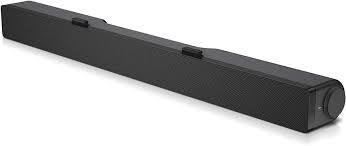
The Dell AC511 and AC511M are soundbars that attach to certain Dell monitors. There are two variants of the AC511 soundbar:


The AC511 and AC511M soundbar technical information:
| Feature | Description |
|---|---|
| Dimensions (W x D x H) | 16 in x 1.9 in x 1.5 in |
| Controls | Volume knob |
| LEDs | Power ON and OFF indicator |
| Mounting | AC511: At the bottom of the monitor AC511M: On the monitor stand with a bracket |
| Power Supply | USB |
The AC511 and AC511M soundbars can be installed on the following monitors:
| Speaker | Monitor Model |
|---|---|
| AC511 | E1914H, E2014H, E2214H, E2214Hv, E2314H E2414H, P1914S, P2014H, P2214H, P2314H, P2414H P2714H, U23.8, U2414H, UP2414HQ, U34, U3214HQ |
| AC511M | E1914H, E1914He, E1916H, E1916He, E1916HL, E1916HM, E1916HV, E2014H, E2014T, E2015HV, E2016, E2016H, E2016HV, E2214H, E2214Hv, E2215HV, E2216H, E2216HV, E2218HN, E2219HN, E2314H, E2316H, E2316Hr, E2318H, E2318HN, E2318HR, E2318HX, E2414H, E2414Hr, E2414Hx, E2417H, E2418HN, E2715H, P1914S P1917S, P1917SWh, P2014H, P2016, P2017H, P2018H, P2214H, P2217 P2217H, P2217Wh, P2219H (with mount), P2219HC (with mount), P2314H, P2317H P2317HWh, P2319H (with mount), P2414H, P2415Q, P2416D, P2417H, P2418D P2418HZ, P2418HZm, P2419H (with mount), P2419HC (with mount), P2714H P2714T, P2715Q, P2717H, P2719H (with mount), P2719HC (with mount) S2719HS (with mount), U2414H, U2415, U2417HJ, U2419H (with mount), U2419HC (with mount) U2515H, U2713H, U2715H, U2719D (with mount), U2719DC (with mount), U2917W U3219Q (with mount), UP2516D, UP2716D, UP2718Q, UP3017, UP3216Q, UZ2215H |
AC511:
The following instructions can be used to install the soundbar on a Dell compatible monitor.


AC511M:
The following instructions can be used to install the soundbar on a Dell compatible monitor.


The following can be used to troubleshoot various issues with the AC511 and AC511M soundbars.
| Symptom | What You May Experience | Possible Solution |
|---|---|---|
| Soundbar not functioning properly | Soundbar that is not detected or sync. |
|
| No Sound | Speaker has power, and the power LED indicator is on. |
|
| Distorted Sound | Computer’s audio is used as the audio source. |
|
| Distorted Sound | Other audio source is used. |
|
| Unbalanced Sound Output | Sound from only one side of the portable speaker. |
|
| Low Volume | Volume is too low. |
|
| Buzzing Noise from Soundbar Speaker | Is the soundbar speaker properly attached to the monitor and no obstruction? |
|
| Line-in No Sound | Is the audio line-in cable plugged in? |
|
| Line-in No Sound | Is the external audio device turned on or playing audio? |
|
| Line-in Distortion | Is the line-in cable properly plugged in? |
|
| Headphone Jack Has No Sound | USB or external audio source not playing music or volume is at 0%. |
|
| Headphone Jack Distortion | Is the headphone line-in cable properly plugged in? |
|
| Cable not long enough and extension cable cannot connect to soundbar USB cable | USB extension cable |
|
| Soundbar Cannot Mount To Monitor | T-Hook |
|
| Missing Items | Package check. |
|
If you have further questions about this article, contact Dell Technical Support.
275,00 EGP
Out of stock
CompareThe Dell AC511 and AC511M are soundbars that attach to certain Dell monitors. There are two variants of the AC511 soundbar:
The AC511 and AC511M soundbar technical information:
| Feature | Description |
|---|---|
| Dimensions (W x D x H) | 16 in x 1.9 in x 1.5 in |
| Controls | Volume knob |
| LEDs | Power ON and OFF indicator |
| Mounting | AC511: At the bottom of the monitor AC511M: On the monitor stand with a bracket |
| Power Supply | USB |
The AC511 and AC511M soundbars can be installed on the following monitors:
| Speaker | Monitor Model |
|---|---|
| AC511 | E1914H, E2014H, E2214H, E2214Hv, E2314H E2414H, P1914S, P2014H, P2214H, P2314H, P2414H P2714H, U23.8, U2414H, UP2414HQ, U34, U3214HQ |
| AC511M | E1914H, E1914He, E1916H, E1916He, E1916HL, E1916HM, E1916HV, E2014H, E2014T, E2015HV, E2016, E2016H, E2016HV, E2214H, E2214Hv, E2215HV, E2216H, E2216HV, E2218HN, E2219HN, E2314H, E2316H, E2316Hr, E2318H, E2318HN, E2318HR, E2318HX, E2414H, E2414Hr, E2414Hx, E2417H, E2418HN, E2715H, P1914S P1917S, P1917SWh, P2014H, P2016, P2017H, P2018H, P2214H, P2217 P2217H, P2217Wh, P2219H (with mount), P2219HC (with mount), P2314H, P2317H P2317HWh, P2319H (with mount), P2414H, P2415Q, P2416D, P2417H, P2418D P2418HZ, P2418HZm, P2419H (with mount), P2419HC (with mount), P2714H P2714T, P2715Q, P2717H, P2719H (with mount), P2719HC (with mount) S2719HS (with mount), U2414H, U2415, U2417HJ, U2419H (with mount), U2419HC (with mount) U2515H, U2713H, U2715H, U2719D (with mount), U2719DC (with mount), U2917W U3219Q (with mount), UP2516D, UP2716D, UP2718Q, UP3017, UP3216Q, UZ2215H |
AC511:
The following instructions can be used to install the soundbar on a Dell compatible monitor.
AC511M:
The following instructions can be used to install the soundbar on a Dell compatible monitor.
The following can be used to troubleshoot various issues with the AC511 and AC511M soundbars.
| Symptom | What You May Experience | Possible Solution |
|---|---|---|
| Soundbar not functioning properly | Soundbar that is not detected or sync. |
|
| No Sound | Speaker has power, and the power LED indicator is on. |
|
| Distorted Sound | Computer’s audio is used as the audio source. |
|
| Distorted Sound | Other audio source is used. |
|
| Unbalanced Sound Output | Sound from only one side of the portable speaker. |
|
| Low Volume | Volume is too low. |
|
| Buzzing Noise from Soundbar Speaker | Is the soundbar speaker properly attached to the monitor and no obstruction? |
|
| Line-in No Sound | Is the audio line-in cable plugged in? |
|
| Line-in No Sound | Is the external audio device turned on or playing audio? |
|
| Line-in Distortion | Is the line-in cable properly plugged in? |
|
| Headphone Jack Has No Sound | USB or external audio source not playing music or volume is at 0%. |
|
| Headphone Jack Distortion | Is the headphone line-in cable properly plugged in? |
|
| Cable not long enough and extension cable cannot connect to soundbar USB cable | USB extension cable |
|
| Soundbar Cannot Mount To Monitor | T-Hook |
|
| Missing Items | Package check. |
|
If you have further questions about this article, contact Dell Technical Support.

 |
 |
 |
|---|---|---|
|
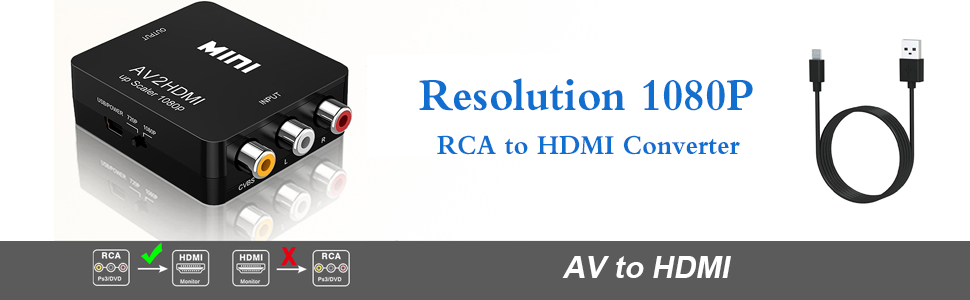
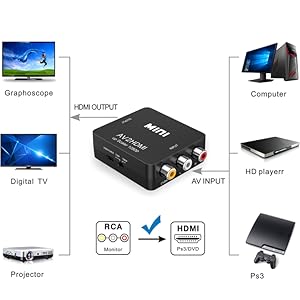
USB POWER SUPPLY Package include: 1xAV to HDMI Converter 1xUSB Power Cable 1xUser Manual
|
AV To HDMI Converter SUPPORT HDMI 1080P or 720P OUTPUT 1. Input ports: 1xRCA (Yellow, White, Red) 2. Output ports: 1xHDMI(standard) 3. NTSC/PAL compatible 4. Composite input: PAL, NTSC3.58, NTSC4.43, SECAM, PAL/M, PAL/N 5. HDMI output: 1080p/60Hz, 720p/60Hz
|
PLUG AND PLAY Supports all old TV or Monitor with HDMI interface. Old TV cam also enjoy high-definition video quality. No need to install drivers, portable, flexible, plug and play.
|
Too See More HDMI supplies click here Visit Alasad Store Face book click here
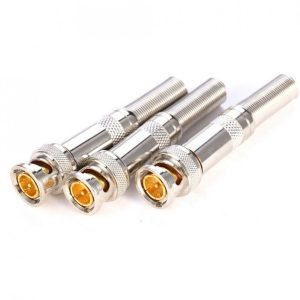
Simply & Professional appearance for BNC cabling;
Easier for camera installation, save time and more securer cable connection;
General quality termination; No electrical tap, No splicing, no crimping, but only a small screw driver;
Material: Copper Pin and Zinc Alloy body;
Size: 58mm x13.3mm
Select at least 2 products
to compare





































There are no reviews yet.