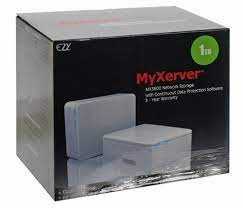
Mx3600
Showing the single result
-
DEVICE STORAGE, SSD
Myxerver Mx3600 Hard Drive Enclousre Rack 3.5 Inch Hdd
My Xerver™ MX3600 Network Storage enclosure with hard drive Power Adapter Ethernet Cable Quick Start Guide •Setup CD Rubber Feet (4x)PC or Mac with internet browser and network access Switch, router or cable modem with one free Ethernet port for MyXerver™ MX3600 NetworkStoragePC users: Windows 2000 / XP / Vista™Mac users : Mac OSX 10.3 or laterConnect the network cable to the Ethernet port at the rear panel of MX3600. Connect the other end to yourhub or switch.2.Connect the power adapter to a power outlet, and plug the power cord into MX3600’s power inputat the rear panel.3.Locate the power button at the rear panel of MX3600. Press it once to power on the NAS.4. MX3600 will start a bootup process, and the system power LED will blink continuously Boot up time is approximately 1 3 minutes. System Power LED HDD Activity LED System Reset USB Eject Button / USB Copy Button USB 2.0 port to add storage or to connect o to printer Auto sensing 10/100/1000 Base T Ethernet port (Auto MDIX) DC In Power Button4SKU: 1000000003751

THKTV02T071 7 Pcs Telecom Tools Set
CyberPower Surge SB0701AD-FR Buster
24 40-Pin 80 Wire UDMA 66100 IDE 2 Drive Cable FI-U02
cable extension 5 meters usb (p)
Ingco MG 13328 Mini Grinder Rotary 130W Tool Kit with 110 pcs accessories
USB 2.0 Extension Extender Cable Cord Standard Type A Male To A Female M/F Black 1.5 meters
FORA ( MODEL 606 ) 6 Eyes With A Key For Each Eye - 10 Amps -3 Meters
Power strip with on button - 4 sockets - 16 amp Turkish
belkin TAA DUAL DP/USB/AUD SKVM CBL, DP M/M; USB A/B, 6'
Point Cable usb printer 10m - gray
Total tools combination pliers (200mm 8'' - tht110806p)
Camelion Charger +4PC AA S2500 BC-1010B
Hub USB 2.0 sa 4 porta I-1004 PUNADA crni
Myxerver Mx3600 Hard Drive Enclousre Rack 3.5 Inch Hdd