



Dell OEM PowerEdge T3600 SAS PERC 8 Raid Contriller Cable – T3F4V
Out of stock
200,00 EGP
Out of stock
CompareDell OEM PowerEdge T3600 SAS PERC 8 RAID Controller Cable – T3F4V
Overview: The Dell OEM PowerEdge T3600 SAS PERC 8 RAID Controller Cable is designed to facilitate high-speed data transfer between the RAID controller and storage drives in a Dell PowerEdge T3600 workstation. This cable is essential for ensuring reliable connectivity and optimal performance of your RAID setup.
Key Features:
- Compatibility: Specifically designed for use with the Dell PowerEdge T3600 workstation and its PERC 8 RAID controller. Ensures proper fit and functionality within this system.
- Cable Type: SAS (Serial Attached SCSI) cable, used for connecting SAS drives to the RAID controller. Supports fast and reliable data transfer.
- Connector Type: Features SAS connectors at both ends to interface with the RAID controller and the SAS drives or backplane. These connectors ensure secure and stable connections.
- Part Number: T3F4V. This unique part number identifies the specific cable model, ensuring compatibility with the PowerEdge T3600 and PERC 8 RAID controller.
Benefits:
- Reliable Performance: Ensures stable and high-speed data transfer between the RAID controller and the connected SAS drives, critical for maintaining system performance and data integrity.
- Efficient Storage Management: Allows the RAID controller to effectively manage multiple SAS drives, supporting various RAID levels for enhanced storage performance and redundancy.
- Ease of Use: Designed for easy installation in the PowerEdge T3600 workstation. The cable is typically plug-and-play, minimizing installation complexity.
Installation Instructions:
- Power Down: Turn off the workstation and disconnect it from the power source to ensure safety.
- Locate Components: Open the workstation chassis and locate the PERC 8 RAID controller and the SAS drives or backplane.
- Connect Cable: Attach one end of the SAS cable to the RAID controller and the other end to the SAS drives or backplane. Ensure that the connectors are securely seated.
- Cable Management: Route the cable to avoid interference with other components and ensure it is neatly organized within the chassis.
- Reassemble and Power On: Close the workstation chassis, reconnect the power, and turn on the system. Verify that the RAID controller detects the connected drives and they are functioning correctly.
Based on 0 reviews
Be the first to review “Dell OEM PowerEdge T3600 SAS PERC 8 Raid Contriller Cable – T3F4V”
Related products
-
DEVICE STORAGE, Flash Disk
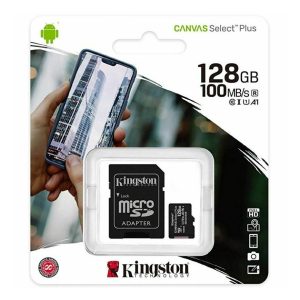
Kingston® 128GB CANVAS Select™ Plus Micro SDXC UHS-I Class 10 A1 100MB/S SD Card
 DEVICE STORAGE, Flash Disk
Kingston® 128GB CANVAS Select™ Plus Micro SDXC UHS-I Class 10 A1 100MB/S SD Card
Capacities
128GB
Performance
100MB/s Read, UHS-I Speed Class, U1, V10 (32GB-128GB)
100/85MB/s Read/Write, UHS-I Speed Class, U3, V30 (256GB-512GB)Dimensions
11mm x 15mm x 1mm (microSD)
24mm x 32mm x 2.1mm (with SD adapter)Format
FAT32 (32GB), ex FAT (64GB-512GB)
Operating temperature
-25°C~85°C
Storage temperature
-40°C~85°C
Voltage
3.3V
SKU: 1037 -
DEVICE STORAGE, Flash Disk
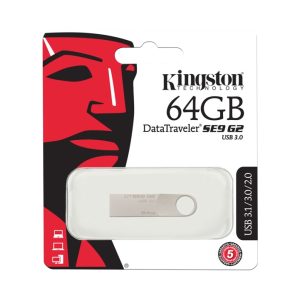
Kingston SE9 Metal USB Flash Drive DataTraveler , 64 GB
Brand Kingston
Product Dimensions 3.9 x 1 x 0.1 cm; 5 g
Item model number DTSE9G3/64GB
Manufacturer Kingston
Series DataTraveler SE9
Colour Gold
Are Batteries Included No
Item Weight 5 g
Guaranteed software updates until unknown
SKU: 740617220476



































There are no reviews yet.