RS232
Showing all 2 results
-
RS232, USB
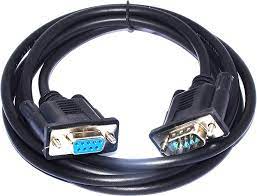
cable serial 9 pin male to female original
- RS-232 serial extension cable extends a COM port connection between your computer and some old device with RS-232 compatible so you can move the serial device further away from your PC
- Black DB9 male to female adapter extender equipped with screws on each end to ensure an easy and solid connection for stable data communication
- The wires inside are of 30AWG gauge and easy to solder to, and they connect to the pins in the order of the standard wire color code
SKU: 1000000001890 1000000002879 -
RS232, USB
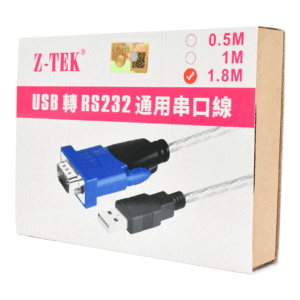
Z-TEK ZE394C USB to Serial RS232 Cable 1.8m
-
USB to RS232 Conversion: Converts a USB port on your computer to an RS232 serial port. This is useful for connecting devices that use serial communication to a modern computer that only has USB ports.
-
Length: The cable is 1.8 meters (approximately 6 feet) long, providing flexibility in positioning your devices.
-
Compatibility: It’s generally compatible with a range of operating systems, but it’s always a good idea to check for specific driver support for your OS (e.g., Windows, macOS, Linux).
-
Driver Support: May require drivers to function correctly. These drivers are typically available on the manufacturer’s website or sometimes included in the package.
-
Data Transfer: Supports standard RS232 data rates and communication protocols.

Common Uses:
-
Connecting Legacy Equipment: Useful for connecting older serial devices like printers, modems, or other peripherals to a modern computer.
-
Industrial Applications: Often used in industrial settings where equipment still relies on serial communication for data transfer.
-
Technical and Engineering Tasks: Useful for tasks that require direct communication with serial devices for configuration or data logging.
Setup Tips:
-
Install Drivers: Before plugging in the cable, install the necessary drivers on your computer to ensure proper functionality.
-
Connect Devices: Plug the USB end into your computer and the RS232 end into your serial device.
-
Configure Ports: Use your computer’s device manager or equivalent to configure the serial port settings if needed.
-
Test the Connection: Use terminal software or other diagnostic tools to ensure the connection is working properly.
SKU: 6955141301278 -

OptiPlex HDD SSD Caddy Tray Adapter 6,35cm 2,5" - 8,89cm 3,5" R494D 0R494D for DELL PC
24-port SOHO Gigabit switch, VLAN, Plug and Play air live Live-24GT
5-port SOHO Gigabit switch, Plug and Play air live Live-5GT
24 40-Pin 80 Wire UDMA 66100 IDE 2 Drive Cable FI-U02
TP-LINK 8-PORT 10/100MBPS DESKTOP NETWORK SWITCH LS1008
zero 4K HDMI Cable 2.0: High-Speed 15 meters
Kubite Wired Microphone Karaoke Classic MIC Old-fashioned Microphone Support Mobile Computer Chat Karaoke Webcast
Aptech S18 Laptop USB Cooling Pad Adjustable 4 Fans
CR1220 Lithium Cell 3V Button Battery
Camelion Charger +4PC AA S2500 BC-1010B