DOCK STATION
Showing all 9 results
-
Accessories, DOCK STATION
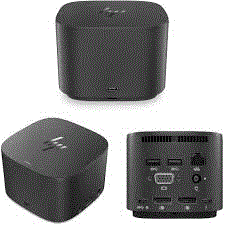
HP HSN-IX01 – HP USB-C Thunderbolt G2 120W Docking Station
-
Connectivity Ports:
- 3 x USB 3.0 Ports: High-speed ports for connecting peripherals such as external hard drives, keyboards, and mice. USB 3.0 supports fast data transfer rates.
- LAN (RJ-45) Port: Provides a wired Ethernet connection for stable and reliable network access, ideal for environments where Wi-Fi may be less reliable or secure.
- Audio Jacks (3.5 mm): Typically includes separate jacks for headphones/speakers and a microphone, allowing you to connect audio devices easily.
- 2 x DisplayPort: Supports high-definition video output to external monitors. Useful for dual-monitor setups or connecting to high-resolution displays.
- 2 x USB Type-C Ports: Modern connectivity options that can support data transfer, power delivery, and video output, depending on the device and dock’s capabilities. Check if the ports support Thunderbolt or other advanced features.
- VGA Port: Provides support for older display devices and projectors. VGA is often used in legacy systems and presentations.
-
Design and Build:
- Compact and Functional: Designed to provide extensive connectivity while maintaining a relatively compact form factor, suitable for desktop use.
- Versatile Compatibility: Typically compatible with laptops that have USB-C, USB 3.0, or specific docking connectors. Check for compatibility with your laptop model.
-
Power Delivery:
- Power Pass-Through: Depending on the model, the dock may offer power pass-through to charge your laptop via USB-C. Verify the dock’s specifications to ensure it supports this feature.
Compatibility:
- Laptops: Generally compatible with laptops that have USB-C or USB 3.0 ports. For USB Type-C ports, confirm whether they support video output (DisplayPort over USB-C) and power delivery if needed.
- Legacy Devices: The VGA port ensures compatibility with older display technologies.
Setup and Use:
- Connection: Connect the docking station to your laptop via the appropriate port (USB-C or docking connector). Ensure the laptop is securely docked.
- Peripheral Connection: Connect your monitors, keyboard, mouse, network cable, and audio devices to the docking station.
- Drivers and Updates: Install any necessary drivers or firmware updates from the manufacturer’s support site to ensure proper operation.
Considerations:
- Performance: Ensure that the docking station meets your performance needs, especially if connecting multiple high-resolution monitors or performing high-data-transfer tasks.
- Compatibility: Verify that your laptop model supports all the docking station’s features, including video output through USB-C if applicable.
SKU: HSN-IX01 -
-