-
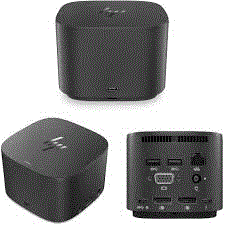
Connectivity Ports:
- 3 x USB 3.0 Ports: High-speed ports for connecting peripherals such as external hard drives, keyboards, and mice. USB 3.0 supports fast data transfer rates.
- LAN (RJ-45) Port: Provides a wired Ethernet connection for stable and reliable network access, ideal for environments where Wi-Fi may be less reliable or secure.
- Audio Jacks (3.5 mm): Typically includes separate jacks for headphones/speakers and a microphone, allowing you to connect audio devices easily.
- 2 x DisplayPort: Supports high-definition video output to external monitors. Useful for dual-monitor setups or connecting to high-resolution displays.
- 2 x USB Type-C Ports: Modern connectivity options that can support data transfer, power delivery, and video output, depending on the device and dock’s capabilities. Check if the ports support Thunderbolt or other advanced features.
- VGA Port: Provides support for older display devices and projectors. VGA is often used in legacy systems and presentations.
-
Design and Build:
- Compact and Functional: Designed to provide extensive connectivity while maintaining a relatively compact form factor, suitable for desktop use.
- Versatile Compatibility: Typically compatible with laptops that have USB-C, USB 3.0, or specific docking connectors. Check for compatibility with your laptop model.
-
Power Delivery:
- Power Pass-Through: Depending on the model, the dock may offer power pass-through to charge your laptop via USB-C. Verify the dock’s specifications to ensure it supports this feature.
Compatibility:
- Laptops: Generally compatible with laptops that have USB-C or USB 3.0 ports. For USB Type-C ports, confirm whether they support video output (DisplayPort over USB-C) and power delivery if needed.
- Legacy Devices: The VGA port ensures compatibility with older display technologies.
Setup and Use:
- Connection: Connect the docking station to your laptop via the appropriate port (USB-C or docking connector). Ensure the laptop is securely docked.
- Peripheral Connection: Connect your monitors, keyboard, mouse, network cable, and audio devices to the docking station.
- Drivers and Updates: Install any necessary drivers or firmware updates from the manufacturer’s support site to ensure proper operation.


Considerations:
- Performance: Ensure that the docking station meets your performance needs, especially if connecting multiple high-resolution monitors or performing high-data-transfer tasks.

- Compatibility: Verify that your laptop model supports all the docking station’s features, including video output through USB-C if applicable.

Headset 3.5mm Female To 2 Dual Male Microphone Audio Stereo Jack
Multi-mode Wireless Silent Optical Mouse M100 Silent
Solder Iron 60 watts
Power Adapter 6V 3000mA 12W AC DC Switching Adaptor
USB 2.0 Extension Extender Cable Cord Standard Type A Male To A Female M/F Black 1.5 meters
optical mouse utopia we-1 wired mouse
Microsoft LifeCam HD-3000 720p Webcam with Digital Microphone and TrueColor Technology (T3H-00011)
3M RCA Audio Video AV Cables Aux 3.5mm Male Stereo Mini Jack To 2 RCA Speaker
Rapoo Wired Optical Mouse BLACK 1000 DPI N1200 silent
1.8M 6Ft DisplayPort Cable 4K High-Speed DP to DP Cord Lead for PC Laptop
Lithium Coin Cell Battery Holder
100 M HDMI Active Optical Cable Fiber Optic HDR 4K ULTRA SLIM
mouse wireless great wall s320
Radio JOC High With TF And USB Slots, Red H011UR
Blower 20 Volt Suction And Expel Speeds Model: INGCO CABLI2001
2200VA Line-Interactive UPS 10 Outlets AVR Software, PRO-2200LCD
TP-Link TL-WR840N 300 Mbps Wireless N Router - White
Mini Digital Speaker E-1044Z Wired USB 2.0 Speaker


There are no reviews yet.